Friday, 30 January 2015

Oracle Tablespace Usage Script - Used and Free

set pagesize 100

column file_name format a32
column tablespace_name format a15
column status format a3 trunc
column t format 999,999.000 heading "Total MB"
column a format a4 heading "Aext"
column p format 990.00 heading "% Free"

SELECT df.file_name,
df.tablespace_name,
df. status,
(df.bytes/1024000) t,
(fs.s/df.bytes*100) p,
decode (ae.y,1,'YES','NO') a
FROM dba_data_files df,
(SELECT file_id,SUM(bytes) s
FROM dba_free_space
GROUP BY file_id) fs,
(SELECT file#, 1 y
FROM sys.filext$
GROUP BY file#) ae
WHERE df.file_id = fs.file_id
AND ae.file#(+) = df.file_id
ORDER BY df.tablespace_name, df.file_id;

Tuesday, 20 January 2015

adding disk to windows cluster 2008 - test mail

Here you can find the disk if You In Run command diskmgmt.msc , below screenshot will find


Right Side , you find a add disk. Click Ok


K Drive its displaying with Cluster Drive 3 , Select & Click Ok


Bringing the Disk to Cluster Disk


Came Online with Letter L, needs to change to K Drive.


Right Side you can find , Change Drive letter with K

You can find with K Drive.


Successfully added to WINDOWS CLUSTER


Friday, 16 January 2015

Failover Cluster - Moving SQL Server resource error

When trying to move "SQL Server (MSSQLSERVER)" service to second node we receive next error:

The operation has failed.
The action "Move to node SQLNODE2" did not complete.

The operation failed because either the specified cluster node is not owner of the group, or the node is not a possible owned of the group


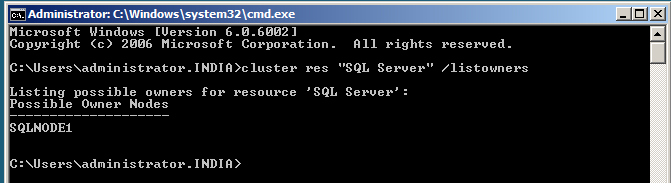
node is owner of the group:
cluster res "SQL Server" /listowners
Node 2 doesn't exist in cluster owner group add it: 
cluster res "SQL Server" /addowner:SQLNODE2

trying to add again getting error

Oops forgot Add Node 
Switch to SQLNODE2 Machine, Mount the Sql server software, Click setup 
You can find ADD NODE option , Click on that button and continue..

Once added, then try to move Node1 to Node2. Then it will move

Wednesday, 14 January 2015

adding Disk to Windows Cluster 2008

Here you can find the disk

if You In Run command diskmgmt.msc , below screenshot will find

Right Side , you find a add disk. Click Ok

K Drive its displaying with Cluster Drive 3 , Select & Click Ok


Bringing the Disk to Cluster Disk


Came Online with Letter L, needs to change to K Drive.

Right Side you can find , Change Drive letter with K


You can find with K Drive.

Successfully added to WINDOWS CLUSTER


Monday, 12 January 2015

oracle 12 c database deinstall steps

Go to the ORACLE_HOME path , there you can find deinstall folder 

[oracle@dbacentre1 ~]$ cd $ORACLE_HOME
[oracle@dbacentre1 dbhome_2]$ cd ..
[oracle@dbacentre1 12.1.0]$ cd dbhome_1
[oracle@dbacentre1 dbhome_1]$ ls -lrt
total 272
-rw-r-----.  1 oracle oinstall    56 Jan 12 15:38 oraInst.loc
drwxr-xr-x.  9 oracle oinstall  4096 Jan 12 15:38 assistants
drwxr-xr-x.  6 oracle oinstall  4096 Jan 12 15:38 crs
drwxr-xr-x.  3 oracle oinstall  4096 Jan 12 15:38 demo
drwxr-xr-x.  7 oracle oinstall  4096 Jan 12 15:38 cv
drwxr-xr-x.  3 oracle oinstall  4096 Jan 12 15:38 diagnostics
drwxr-xr-x.  3 oracle oinstall  4096 Jan 12 15:38 has
drwxr-xr-x.  8 oracle oinstall  4096 Jan 12 15:38 javavm
drwxr-xr-x.  5 oracle oinstall  4096 Jan 12 15:38 md
drwxr-xr-x.  5 oracle oinstall  4096 Jan 12 15:38 nls
drwxr-xr-x.  7 oracle oinstall  4096 Jan 12 15:38 odbc
drwxr-xr-x.  7 oracle oinstall  4096 Jan 12 15:38 ord
drwxr-xr-x.  4 oracle oinstall  4096 Jan 12 15:38 oracore
drwxr-xr-x.  4 oracle oinstall  4096 Jan 12 15:38 owm
drwxr-xr-x.  3 oracle oinstall  4096 Jan 12 15:38 plugins
drwxr-xr-x.  5 oracle oinstall  4096 Jan 12 15:38 perl
drwxr-xr-x.  6 oracle oinstall  4096 Jan 12 15:38 precomp
drwxr-xr-x.  3 oracle oinstall  4096 Jan 12 15:38 slax
drwxr-xr-x.  4 oracle oinstall  4096 Jan 12 15:38 scheduler
drwxr-xr-x.  3 oracle oinstall  4096 Jan 12 15:38 relnotes
drwxr-xr-x.  3 oracle oinstall  4096 Jan 12 15:38 sqlj
drwxr-xr-x.  4 oracle oinstall  4096 Jan 12 15:38 sysman
drwxr-xr-x.  3 oracle oinstall  4096 Jan 12 15:38 wwg
drwxr-xr-x.  3 oracle oinstall  4096 Jan 12 15:38 usm
drwxr-xr-x.  6 oracle oinstall  4096 Jan 12 15:39 plsql
drwxr-xr-x.  2 oracle oinstall  4096 Jan 12 15:39 sqlpatch
drwxr-xr-x.  4 oracle oinstall  4096 Jan 12 15:39 dbhadoop
drwxr-xr-x.  2 oracle oinstall  4096 Jan 12 15:39 utl
drwxr-xr-x.  7 oracle oinstall  4096 Jan 12 15:40 xdk
drwxr-xr-x.  2 oracle oinstall  4096 Jan 12 15:40 instantclient
drwxr-xr-x.  8 oracle oinstall  4096 Jan 12 15:40 dmu
drwxr-xr-x. 19 oracle oinstall  4096 Jan 12 15:41 oc4j
drwxr-xr-x.  7 oracle oinstall  4096 Jan 12 15:41 apex
drwxr-xr-x. 15 oracle oinstall  4096 Jan 12 15:42 sqldeveloper
drwxr-xr-x.  2 oracle oinstall  4096 Jan 12 15:42 dc_ocm
drwxr-xr-x.  2 oracle oinstall  4096 Jan 12 15:42 jlib
drwxr-xr-x.  6 oracle oinstall  4096 Jan 12 15:42 jdk
drwxr-xr-x.  3 oracle oinstall  4096 Jan 12 15:42 jdbc
drwxr-xr-x.  3 oracle oinstall  4096 Jan 12 15:42 ucp
drwxr-xr-x.  7 oracle oinstall  4096 Jan 12 15:47 OPatch
drwxr-xr-x.  7 oracle oinstall  4096 Jan 12 15:47 ccr
drwxr-xr-x.  2 oracle oinstall  4096 Jan 12 15:47 addnode
drwxr-xr-x.  4 oracle oinstall  4096 Jan 12 15:47 clone
drwxr-xr-x.  3 oracle oinstall  4096 Jan 12 15:47 cdata
drwxr-xr-x.  6 oracle oinstall  4096 Jan 12 15:47 css
drwxr-xr-x.  7 oracle oinstall  4096 Jan 12 15:47 opmn
drwxr-xr-x. 12 oracle oinstall  4096 Jan 12 15:47 ldap
drwxr-xr-x.  9 oracle oinstall  4096 Jan 12 15:47 srvm
drwxr-xr-x.  7 oracle oinstall  4096 Jan 12 15:47 racg
drwxr-xr-x. 10 oracle oinstall  4096 Jan 12 15:47 ctx
drwxr-xr-x.  7 oracle oinstall  4096 Jan 12 15:48 sqlplus
drwxr-xr-x.  8 oracle oinstall  4096 Jan 12 15:50 oui
drwxr-xr-x. 10 oracle oinstall  4096 Jan 12 15:50 network
drwxr-xr-x.  3 oracle oinstall 12288 Jan 12 15:50 lib
drwxr-xr-x.  5 oracle oinstall  4096 Jan 12 15:50 deinstall
drwxr-xr-x.  5 oracle oinstall  4096 Jan 12 15:50 hs
drwxr-xr-x.  2 oracle oinstall  4096 Jan 12 15:50 bin
-rwxr-x---.  1 oracle oinstall   454 Jan 12 15:50 root.sh
drwxr-xr-x. 14 oracle oinstall  4096 Jan 12 15:50 rdbms
drwxr-x---. 13 oracle oinstall  4096 Jan 12 15:51 inventory
drwxr-xr-x.  4 oracle oinstall  4096 Jan 12 15:54 cfgtoollogs
drwxr-xr-x.  2 oracle oinstall  4096 Jan 12 16:08 QOpatch
drwxr-xr-x.  4 oracle oinstall  4096 Jan 12 16:33 log
drwxr-xr-x.  6 oracle oinstall  4096 Jan 12 16:59 install
drwxr-xr-x.  3 oracle oinstall  4096 Jan 12 17:23 admin
drwxr-xr-x.  2 oracle oinstall  4096 Jan 12 18:03 dbs

[oracle@dbacentre1 dbhome_1]$ cd deinstall/
[oracle@dbacentre1 deinstall]$ pwd
/u01/app/oracle/product/12.1.0/dbhome_1/deinstall
[oracle@dbacentre1 deinstall]$ ls
bootstrap_files.lst  deinstall     deinstall.xml  readme.txt  sshUserSetup.sh
bootstrap.pl         deinstall.pl  jlib           response    utl
[oracle@dbacentre1 deinstall]$


[oracle@dbacentre1 deinstall]$ ./deinstall
Checking for required files and bootstrapping ...
Please wait ...
Location of logs /u01/app/oraInventory/logs/

############ ORACLE DEINSTALL & DECONFIG TOOL START ############


######################### CHECK OPERATION START #########################
## [START] Install check configuration ##


Checking for existence of the Oracle home location /u01/app/oracle/product/12.1.0/dbhome_1
Oracle Home type selected for deinstall is: Oracle Single Instance Database
Oracle Base selected for deinstall is: /u01/app/oracle
Checking for existence of central inventory location /u01/app/oraInventory
Checking for sufficient temp space availability on node(s) : 'dbacentre1'

## [END] Install check configuration ##


Network Configuration check config START

Network de-configuration trace file location: /u01/app/oraInventory/logs/netdc_check2015-01-12_08-06-01-PM.log

Specify all Single Instance listeners that are to be de-configured [LISTENER]:

De-configuring Single Instance listener(s): LISTENER

De-configuring listener: LISTENER
    Stopping listener: LISTENER
    Listener stopped successfully.
    Deleting listener: LISTENER
    Listener deleted successfully.
Listener de-configured successfully.

De-configuring Listener configuration file...
Listener configuration file de-configured successfully.

De-configuring Local Net Service Names configuration file...
Local Net Service Names configuration file de-configured successfully.

De-configuring backup files...
Backup files de-configured successfully.

The network configuration has been cleaned up successfully.

Network Configuration clean config END

Oracle Configuration Manager clean START
OCM clean log file location : /u01/app/oraInventory/logs//ocm_clean3078.log
Oracle Configuration Manager clean END
Setting the force flag to false
Setting the force flag to cleanup the Oracle Base
Oracle Universal Installer clean START
Detach Oracle home '/u01/app/oracle/product/12.1.0/dbhome_1' from the central inventory on the local node : Done

Delete directory '/u01/app/oracle/product/12.1.0/dbhome_1' on the local node : Done

NOTE:-

The Oracle Base directory '/u01/app/oracle' will not be removed on local node. The directory is in use by Oracle Home '/u01/app/oracle/product/12.1.0/dbhome_2'.

Oracle Universal Installer cleanup was successful.

Oracle Universal Installer clean END


## [START] Oracle install clean ##

Clean install operation removing temporary directory '/tmp/deinstall2015-01-12_08-11-03PM' on node 'dbacentre1'

## [END] Oracle install clean ##


######################### CLEAN OPERATION END #########################


####################### CLEAN OPERATION SUMMARY #######################
Following Single Instance listener(s) were de-configured successfully: LISTENER
Cleaning the config for CCR
As CCR is not configured, so skipping the cleaning of CCR configuration
CCR clean is finished
Successfully detached Oracle home '/u01/app/oracle/product/12.1.0/dbhome_1' from the central inventory on the local node.
Successfully deleted directory '/u01/app/oracle/product/12.1.0/dbhome_1' on the local node.
Oracle Universal Installer cleanup was successful.

Oracle deinstall tool successfully cleaned up temporary directories.
#######################################################################


############# ORACLE DEINSTALL & DECONFIG TOOL END #############


verify the folders , dbhome_1 folder as been deleted

[oracle@dbacentre1 12.1.0]$ ls -lrt
total 4
drwxr-xr-x. 70 oracle oinstall 4096 Jan 12 19:59 dbhome_2

[oracle@dbacentre1 12.1.0]$


Sunday, 11 January 2015

ORA-65066: The specified changes must apply to all containers - ORACLE 12 C

SQL> CONN system/oracle@pdb1
Connected.
SQL> alter user system identified by oracle12;
alter user system identified by oracle12
*
ERROR at line 1:
ORA-65066: The specified changes must apply to all containers


Connect to CDB database ,Then you can reset the system user then it will applies to all PDB's as well.

SQL> conn sys as sysdba
Enter password:
Connected.
SQL> alter user system identified by oracle12;

User altered.

SQL> CONN system/oracle12@pdb1
Connected.

SQL> SHOW CON_NAME

CON_NAME
------------------------------
PDB1

monitoring CDB and PDB tablespaces and users - ORACLE 12 C Database

SQL> CONN system/oracle@pdb1

Connected.


SQL> select name from v$datafile;

NAME

--------------------------------------------------------------------------------

/oradata/orcl/undotbs01.dbf

/oradata/ORCL/datafile/pdb1/system01.dbf

/oradata/ORCL/datafile/pdb1/sysaux01.dbf

/oradata/ORCL/datafile/pdb1/users01.dbf


SQL> create tablespace dbacentre datafile '/oradata/ORCL/datafile/pdb1/dba1.dbf' size 10M;

Tablespace created.

SQL> select name from v$datafile;

NAME
--------------------------------------------------------------------------------
/oradata/orcl/undotbs01.dbf

/oradata/ORCL/datafile/pdb1/system01.dbf

/oradata/ORCL/datafile/pdb1/sysaux01.dbf

/oradata/ORCL/datafile/pdb1/users01.dbf

/oradata/ORCL/datafile/pdb1/dba1.dbf


SQL> create user sarath identified by sarath default tablespace jyothi;

User created.

SQL> grant connect,resource to sarath;

Grant succeeded.

SQL> conn sarath/sarath

ERROR:

ORA-01017: invalid username/password; logon denied

Warning: You are no longer connected to ORACLE.


Needs to mention tns of PDB database name

SQL> conn sarath/sarath@pdb1
Connected.
SQL> create table test(names char(30));
Table created.
SQL> insert into test values ('records');
1 row created.
SQL> /
1 row created.
SQL> /
1 row created.
SQL> /
1 row created.


Connecting CDB Database and comparing the tablespace names

SQL> conn sys as sysdba
Enter password:
Connected.
SQL> SHOW CON_NAME

CON_NAME
------------------------------
CDB$ROOT

SQL> select tablespace_name from dba_tablespaces;

TABLESPACE_NAME
------------------------------
SYSTEM
SYSAUX
UNDOTBS1
TEMP
USERS

again connecting to PDB database and will have a look

SQL> conn system/oracle@pdb1
Connected.
SQL>  SHOW CON_NAME

CON_NAME
------------------------------
PDB1

SQL> select tablespace_name from dba_tablespaces;

TABLESPACE_NAME
------------------------------
SYSTEM
SYSAUX
TEMP
USERS
dbacentre


Saturday, 10 January 2015

oracle 12c software installation with existing oracle 11g database

Installing oracle 12C Database software

we have oinstall,dba,oper group already we have oracle 11g database having the server(machine)
oracle 12C related groups


groupadd -g 1004 backupdba
groupadd -g 1005 dgdba
groupadd -g 1006 kmdba
groupadd -g 1007 asmdba
groupadd -g 1008 asmoper
groupadd -g 1009 asmadmin

need to execute with root user
cd /u02
mkdir app
chown -R root:oinstall app

or

chown -R root:oinstall /u02/app/


mkdir -p /u02/app/oracle/product/12.1.0/dbhome_1
chown -R oracle:oinstall /u02/app/

mkdir -p /u02/oradata/
chown -R root:oinstall /u02/oradata/

mkdir -p /u02/app/oraInventory/
chown -R oracle:oinstall /u02/app/oraInventory/


---startup the operation system
---Mount the software in the vmware

[root@machine2 ~]# chown -R root:oinstall /u02/app/
[root@machine2 ~]# chown -R root:oinstall /mnt/hgfs/12database/database


Switch to oracle user and set the bash profile
##-----oracle bash profile
export PATH
export oracle_BASE=/u02/app/oracle
export ORACLE_HOME=/u02/app/oracle/product/12.1.0/dbhome_1
export PATH=$PATH:$ORACLE_HOME/bin


oracle$cd /oracle12/database/
oracle$./runInstaller

----

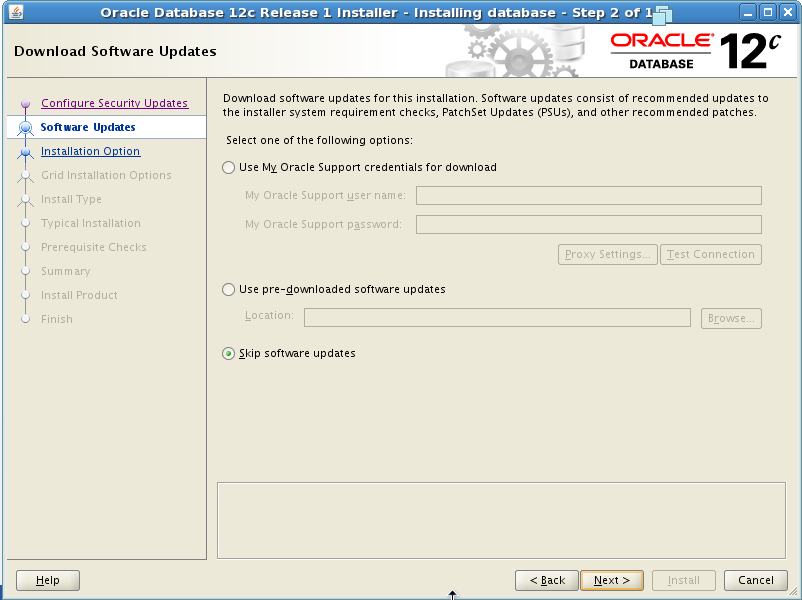
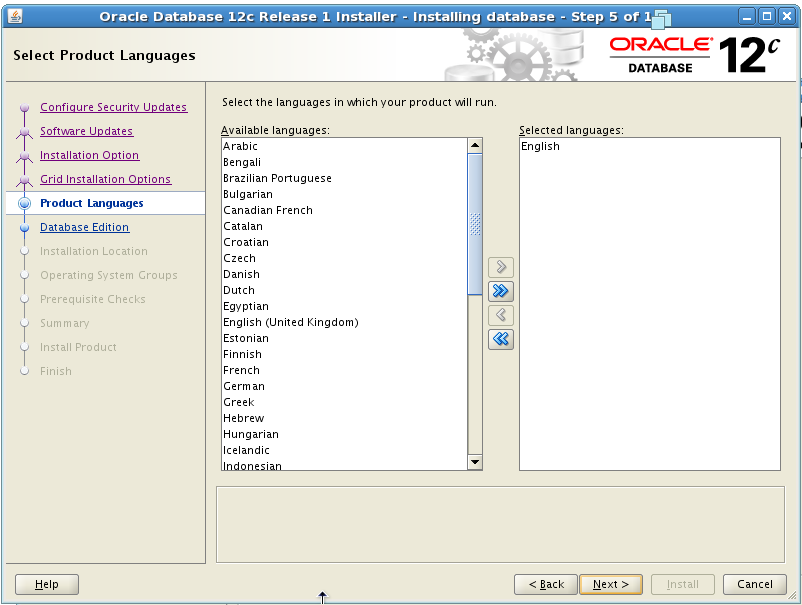
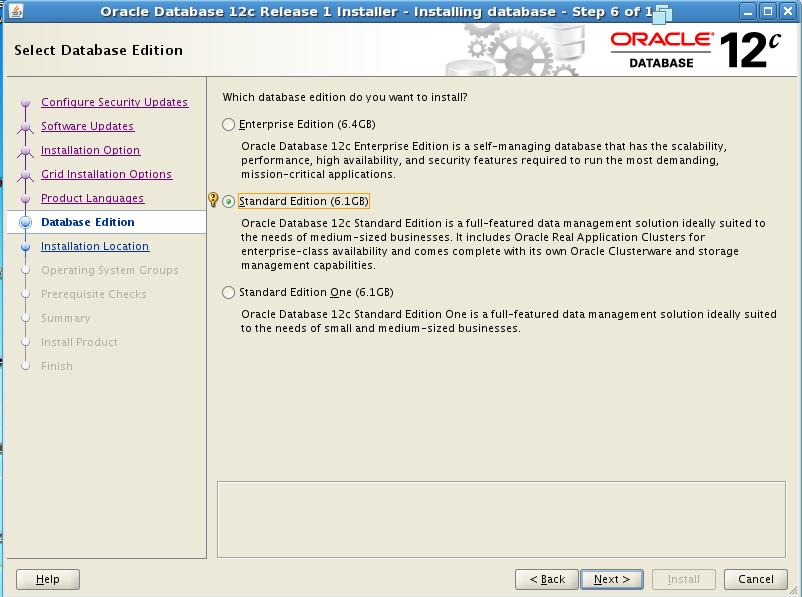
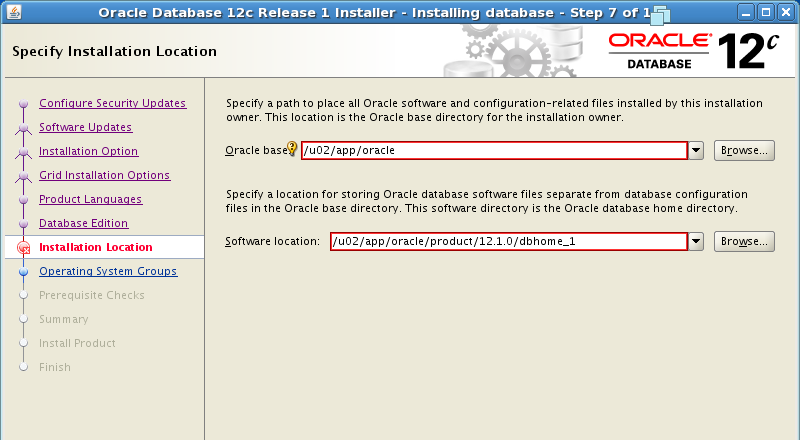
Below you can find screenshots


Once completed you will get success alert

Tuesday, 6 January 2015

Msg 22026, Level 16, State 1, Line 0 The enlist operation failed (reason: SQLServerAgent Error: The target server cannot establish an encrypted connection to the master server 'MSXSERVER\INSTANCE'. Make sure that the MsxEncryptChannelOptions registry subkey is set correctly on the target server.)

you cannot use a certificate for Secure Sockets Layer (SSL) encrypted communications between master servers and some or all of your target servers, but you want to encrypt the channel between them, configure the target server to use the level of security required.
To configure the appropriate level of security required for a specific master server/target server communication channel, set the SQL Server Agent registry subkey\HKEY_LOCAL_MACHINE\SOFTWARE\Microsoft\Microsoft SQL Server\dbacentre\SQLServerAgent\MsxEncryptChannelOptions(REG_DWORD) on the target server to one of the following values. 
The value of <dbacentre> is MSSQL.n. For example, MSSQL.1 or MSSQL.3.

If 1 or 2 is specified, you must have SSL enabled on both the master and target servers. If 2 is specified, you must also have a properly signed certificate present on the master server.

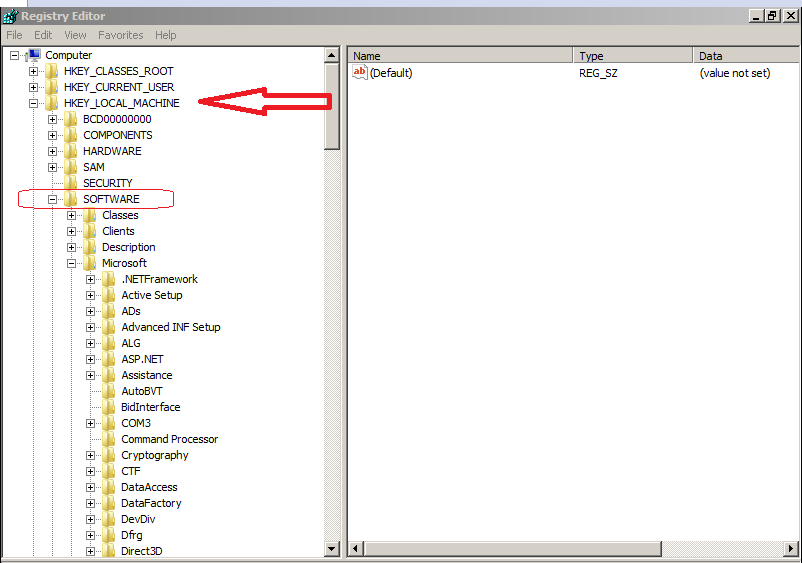
Steps , Go to run command ,regedit Enter..


You can find below , MsxEncryptChannelOptions . CLICK on that make 0


Same method you can do it , MSX Server and TSX Servers. Then it will works

Saturday, 3 January 2015

Installation of SQL Server 2012 on Windows Server 2012

Installation of SQL Server 2012 on Windows Server 2012

Mount the CD and RUN the Setup file


You will the face the issue 


Once Every thing went smoothly also we will face the issues. Find the below

Failed Because of 3.5 Dotnet framework as to install, For that we can enable the feature .


Even though it failed find the below 


It fails again, 
then needs to follow one more step see below, Insert windows OS CD and then follow steps


Click OK and Install


Then again to install SQL Server 2012 and Lunch the SQL Server – alone installation


Next and Install 


Popular Posts